
#405 YouTube Time-stamped Link Maker
I wanted an easy way to generate markdown links to specific times in YouTube videos, using the actual video title and rendering the time in a more convenient hh:mm:ss format.
Notes
When making notes for courses, or music study for example, I often want to create markdown links to specific timestamped sections in videos.
Say, for example, I have a link from YouTube like this:
https://youtu.be/ky2z2mMQO40?si=ek-z2G0Rpv0Uz4fv&t=240
I’d like to be able to generate a markdown link in a few different formats.
Firstly, a simple markdown link using the actual video title, and the timestamp in “hh:mm:ss” instead of total seconds, i.e.:
[LIV MOON - THE WINTER (VIVALDI FOUR SEASONS) (00:04:00)](https://youtu.be/ky2z2mMQO40?si=ek-z2G0Rpv0Uz4fv&t=240)
Or sometimes, substituting my own title text e.g.
[Custom Title Text (00:04:00)](https://youtu.be/ky2z2mMQO40?si=ek-z2G0Rpv0Uz4fv&t=240)
Or finally, as a video image link e.g.
[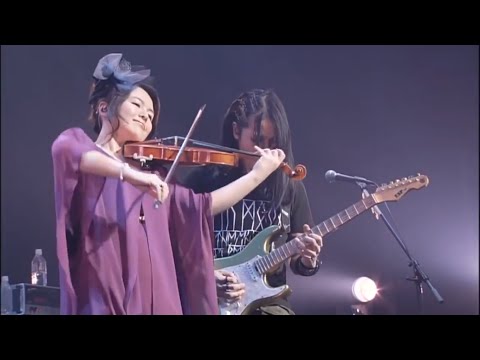](https://youtu.be/ky2z2mMQO40?si=ek-z2G0Rpv0Uz4fv&t=240)
Generated Links
Using the script yt-md-link.py in the various ways…
Simple Link with the Actual Title
Invocation:
$ ./yt-md-link.py "https://youtu.be/ky2z2mMQO40?si=ek-z2G0Rpv0Uz4fv&t=240"
[LIV MOON - THE WINTER (VIVALDI FOUR SEASONS) (00:04:00)](https://youtu.be/ky2z2mMQO40?si=ek-z2G0Rpv0Uz4fv&t=240)
The markdown renders as follows:
LIV MOON - THE WINTER (VIVALDI FOUR SEASONS) (00:04:00)
Note: if there’s no timestamp in the video link, it just renders the plain link:
$ ./yt-md-link.py "https://youtu.be/ky2z2mMQO40?si=ek-z2G0Rpv0Uz4fv"
[LIV MOON - THE WINTER (VIVALDI FOUR SEASONS)](https://youtu.be/ky2z2mMQO40?si=ek-z2G0Rpv0Uz4fv)
The markdown renders as follows:
LIV MOON - THE WINTER (VIVALDI FOUR SEASONS)
Simple Link with a Custom Title
Invocation:
$ ./yt-md-link.py "https://youtu.be/ky2z2mMQO40?si=ek-z2G0Rpv0Uz4fv&t=240" -t "Custom Title"
[Custom Title (00:04:00)](https://youtu.be/ky2z2mMQO40?si=ek-z2G0Rpv0Uz4fv&t=240)
The markdown renders as follows:
Image Link with the Actual Title
Invocation:
$ ./yt-md-link.py "https://youtu.be/ky2z2mMQO40?si=ek-z2G0Rpv0Uz4fv&t=240" -i
[](https://youtu.be/ky2z2mMQO40?si=ek-z2G0Rpv0Uz4fv&t=240)
The markdown renders as follows:

Image Link with a Custom Title
Invocation:
$ ./yt-md-link.py "https://youtu.be/ky2z2mMQO40?si=ek-z2G0Rpv0Uz4fv&t=240" -i -t "Custom Title"
[](https://youtu.be/ky2z2mMQO40?si=ek-z2G0Rpv0Uz4fv&t=240)
The markdown renders as follows:
The Script
The final version of the script yt-md-link.py is listed below.
#!/usr/bin/env python3
"""
Turns a YouTube URL with timestamp into a Markdown link
"""
import argparse
import sys
import re
import json
from urllib.request import Request, urlopen
from urllib.error import URLError, HTTPError
import urllib.parse
def parse_timestamp(url: str) -> str:
parsed = urllib.parse.urlparse(url)
qs = urllib.parse.parse_qs(parsed.query)
t_str = qs.get("t", [None])[0] or re.search(r"[?&]t=(\d+)s?", url)
if t_str is None:
return ""
if isinstance(t_str, str):
# came from query string
seconds = int(t_str)
else:
# came from regex
seconds = int(t_str.group(1))
hh, mm = divmod(seconds, 3600)
mm, ss = divmod(mm, 60)
marker = f" ({hh:02d}:{mm:02d}:{ss:02d})"
return marker
def get_title(url: str) -> str:
params = urllib.parse.urlencode({"url": url, "format": "json"})
oembed_url = f"https://www.youtube.com/oembed?{params}"
req = Request(oembed_url, headers={"User-Agent": "Mozilla/5.0"})
with urlopen(req, timeout=10) as resp:
data = resp.read().decode("utf-8")
info = json.loads(data)
title = info.get("title")
if not title:
raise RuntimeError("oEmbed response missing title")
return title
def get_video_id(url: str) -> str:
video_id_match = re.search(r"(?:v=|youtu\.be/)([a-zA-Z0-9_-]{11})", url)
if not video_id_match:
sys.exit("Error: Could not extract video ID from URL")
video_id = video_id_match.group(1)
return video_id
def main() -> None:
parser = argparse.ArgumentParser(prog="yt-md-link.py", description="Turn a YouTube URL with timestamp into a Markdown link or image.")
parser.add_argument("url", help="YouTube URL with timestamp")
parser.add_argument("-t", "--title", help="Override fetched title", metavar="STRING")
parser.add_argument("-i", "--image", action="store_true", help="Output image markdown instead of a link")
args = parser.parse_args()
video_id = get_video_id(args.url)
time_marker = parse_timestamp(args.url)
title = args.title if args.title is not None else get_title(args.url)
if args.image:
print(f"[]({args.url})")
else:
print(f"[{title}{time_marker}]({args.url})")
if __name__ == "__main__":
main()
Credits and References
- YouTube OEmbed/IFrame Reference
- https://oembed.com/
- https://github.com/yt-dlp/yt-dlp - original version used yt-dlp to make the YouTube Oembed call, but no longer required